




Many students say they want to find the best AI for studying. The one tool that does it all.
That is a lie.
There is no such thing as a single best AI. It's not how these tools work. Unless you count using ChatGPT for math, essays, research, citations and brainstorming all in one chat productive.
OpenAI, Anthropic and Google have each built a powerful tool inside your browser but each one can only really do one thing well at a time.
Sure — they'll all technically answer any question you throw at them. The problem is the answer often isn't very good.
It's a great time to be a student. It's just not a great time to be guessing which AI to open.

What does "Best AI" even mean?
Students often ask me which AI is the best. I always tell them the same thing: there isn't one. There's just the best one for the thing you're trying to do right now.
If a friend tells you ChatGPT is the best, what they really mean is it's the best for the stuff they personally use it for. They've found one workflow it handles well, and now every problem looks like that workflow. But unless you only ever do one type of task, forcing the wrong tool onto the wrong job is a fast way to get mediocre results.
The Head-to-Head Comparison: ChatGPT vs. Claude vs. Gemini
When you need a job done correctly, you have to choose the right model. Here is how they stack up across the three pillars of student work: math, writing, and research.
1. ChatGPT: The Logic & Math Explainer
ChatGPT (powered by the latest GPT models) is excellent at explaining logical structures, step-by-step math reasoning, and coding problems. It operates like a Socratic tutor—especially when used with structured prompts. However, ChatGPT can still slip on multi-step arithmetic, so it's always best to verify its calculations with Wolfram Alpha.
2. Claude: The Essay & Reading Coach
Claude is the gold standard for language. Its writing sounds natural, avoiding the robotic cadence and cliché words (like "tapestry," "delve," or "testament") that instantly trigger AI detectors. If you need to summarize a 50-page reading, outline an essay, or get feedback on your tone, Claude is the tool to open. Its only major drawback is the strict message limits on Anthropic's free tier.
3. Gemini: The Real-Time Research Engine
Gemini excels at gathering current facts and searching the web. Because it integrates directly with Google Search, it is far less likely to hallucinate fake sources than ChatGPT or Claude. If you are starting a research paper, looking for real academic references, or sorting through current news, Gemini is your starting point.
| Task | Best AI | Why It Wins | What to Watch For |
|---|---|---|---|
| Math & Logic | ChatGPT | Step-by-step logic, tutoring, and programming. | Can make basic arithmetic errors; double-check math. |
| Writing & Essays | Claude | Natural tone, avoids AI clichés, handles massive texts. | Strict message caps on the free version. |
| Research & Sources | Gemini | Direct integration with Google Search, live citations. | Can struggle with highly complex analytical prompts. |
The Verdict: Which one should you open?
I'm not going to give you the cop-out "it depends." Here is the direct playbook for your study sessions:
Open Claude For
Reading & Writing- ✓ Essays, papers, literature reviews
- ✓ Long textbooks & PDF readings
- ✓ Tone feedback & active editing
Open ChatGPT For
Logic & Coding- ✓ Math, physics, chemistry, programming
- ✓ Quick conceptual explanations & Q&A
- ✓ Voice-based tutoring sessions
Open Gemini For
Web Research- ✓ Finding live academic references
- ✓ Google Workspace integration
- ✓ Deep Research facts & live events
If you only had to pick one: pick Claude if you write and read more than you calculate. Pick ChatGPT if your courses are heavily quantitative. But the real answer is to keep Claude open for your main reading/writing tasks, ChatGPT open for math/code, and Gemini ready when you need to research a live source.
The Multitasking Trap (Why more tabs mean less studying)

Because each tool has unique strengths, many students try to use them all at once. They pin tabs for ChatGPT, Claude, and Gemini in their browser, copying and pasting the exact same prompt into all three to compare answers.
This feels productive. It isn't. It's just a new form of procrastination. Running three parallel conversations means you end up with three different, sometimes contradicting answers. Your brain gets overloaded trying to decide which chatbot to trust, and you spend more time managing tabs than actually learning the material.
On the flip side, committing to "just one AI" to avoid this noise doesn't work either. If you run everything through Claude, your writing will look great but your math homework will suffer. If you run everything through ChatGPT, you'll get confident answers, but you risk turning in essays that sound robotic and papers with hallucinated citations.
The Pro Workflow: One Tool Per Job

The most effective way to study with AI is to keep a single tool open for the specific task at hand. When you finish that task and move to another, you switch to the appropriate tool. No comparisons, no parallel chats, no cognitive overload.
If you only remember three rules for your workflow:
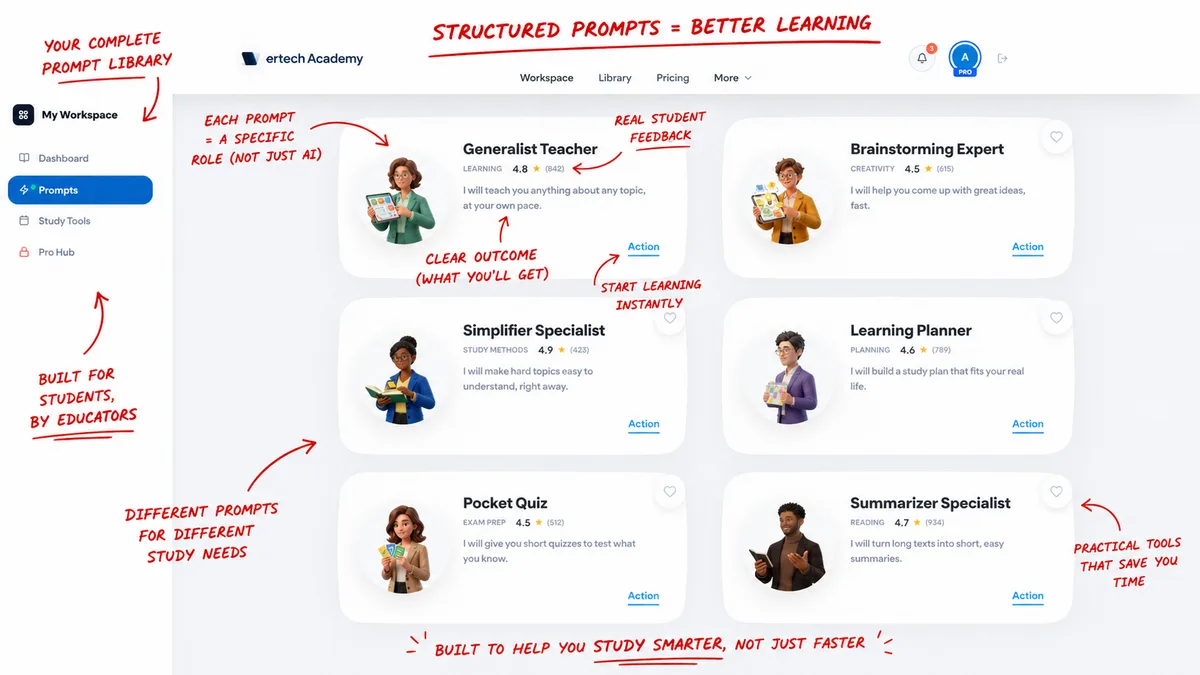
- Math, brainstorming, and explanations → Open ChatGPT with our Brainstorming Expert prompt
- Essays, long readings, and tone → Open Claude with our Summarizer Specialist prompt
- Research, sources, and citations → Open Gemini with our Research Assistant prompt
The skill isn't picking one tool to do everything. It's knowing which one to open for the task in front of you. Once you match the tool to the job, the feeling of "being bad at AI" disappears. It was never about your capability; it was about working without a system.
Where Vertech fits

I built Vertech Academy because I watched too many students try to run their entire study system through a single, generic ChatGPT window—or get overwhelmed trying to manage three different tools.
Vertech is a prompt library designed for this exact workflow. We don't just give you a list of prompts. We give you full study systems built and tested for each specific tool: the Generalist Teacher prompt optimized for ChatGPT's logic, the Essay Coach engineered for Claude's writing style, and the Research Assistant built to keep Gemini focused on real sources. Every system is rebuilt three times to match how these models actually think.
It's $10/month. The full library, rebuilt across ChatGPT, Claude, and Gemini, updated every time the models change. Our guarantee is simple: if your grades don't go up, you don't pay.
If you've read this far, you're not the type who copies answers. You're the type who wants the tool to teach you. That's who these are built for.
My final suggestion
If you're just starting, run the rotation. ChatGPT for logic explanations, Claude for reading summaries, Gemini for searching sources. Grab the cheat sheet so you don't have to remember which goes where.
And if you've got a midterm or final on your calendar in the next month or two — that's the window. Not the week of, when nothing sticks. Three to four weeks out, when the prompts have time to actually teach you something.
That window is open right now. Most students miss it and show up to finals week panicking.
Free tools first. The prompts when you're ready — and if your exams are a month out, you're ready.
Liked the article? Share it!

